

DMARC Explained: What p=none, quarantine and reject Really Mean
Email is the primary vector for modern cyberattacks. Every day, malicious actors attempt to bypass spam filters to deliver phishing payloads, ransomware, and fraudulent payment requests. If your domain lacks proper security protocols, anyone can impersonate your brand, destroying your sender reputation and tricking your customers.
DMARC (Domain-based Message Authentication, Reporting, and Conformance) is the industry-standard protocol designed to stop exact-domain impersonation. At the core of this protocol is the DMARC policy, which instructs receiving mail servers exactly how to handle emails that fail authentication checks.
Understanding how these policies function is critical for securing your email channel. This guide provides a comprehensive explanation of DMARC policies to help you transition from basic monitoring to absolute enforcement.
The Short Answer: DMARC Policies at a Glance
A DMARC policy is a DNS-based instruction published by a domain owner. When a receiving mail server (such as Gmail, Yahoo, or Microsoft Outlook) receives an email, it checks the sender's DMARC record to determine what to do if the email fails authentication.
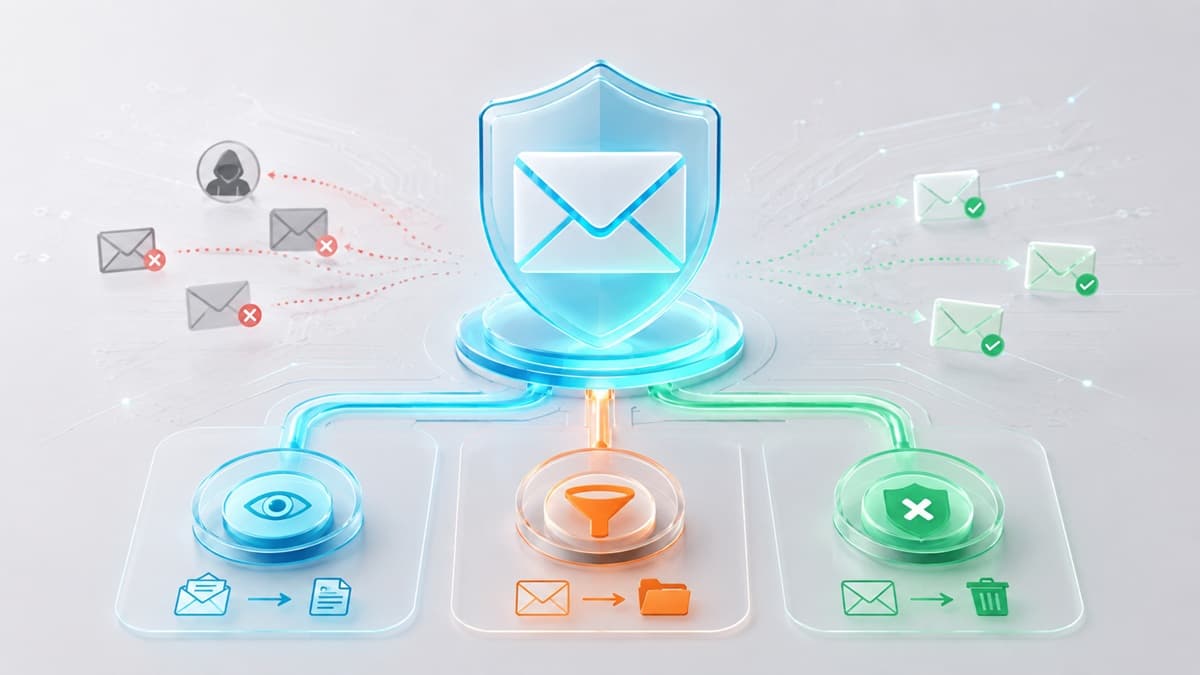
There are three distinct DMARC policies you can enforce:
- p=none (Monitoring): The receiving server delivers the email to the recipient's inbox normally, regardless of whether it passes or fails authentication. The server then generates a report and sends it to the domain owner.
- p=quarantine (Soft Fail): The receiving server diverts emails that fail authentication away from the primary inbox, typically placing them in the recipient's spam or junk folder.
- p=reject (Hard Fail): The receiving server completely blocks emails that fail authentication. The message is dropped at the gateway and is never delivered to the recipient.
To inspect your current DNS configuration and see which policy your domain is actively publishing, you can use a dmarc checker to retrieve and analyze your live record.
How DMARC Works: Authentication and Alignment
DMARC does not replace existing email authentication protocols; instead, it acts as an orchestration layer that builds upon them. Specifically, DMARC relies on SPF (Sender Policy Framework) and DKIM (DomainKeys Identified Mail) to verify the authenticity of a message.
An SPF record allows domain owners to specify which IP addresses are authorized to send mail on behalf of their domain. A DKIM setup provides cryptographic verification that an email was sent by the domain owner and was not altered in transit.
DMARC introduces the concept of "alignment" to ensure these protocols actually protect your brand. For an email to pass DMARC, it must satisfy two conditions:
- The email must pass SPF authentication, DKIM authentication, or both.
- The domain used in the visible "From" header must align with the domain verified by SPF or DKIM.
This alignment check is crucial because scammers can easily configure SPF and DKIM to pass using their own malicious domains, while still displaying your trusted domain in the visible "From" header to trick the recipient. DMARC closes this loophole by requiring the domains to match.
There are two types of alignment:
- SPF Alignment: The domain in the "Return-Path" address (the envelope sender used for bounce messages) must match the domain in the visible "From" header. Under relaxed alignment, they must share the same organizational domain (e.g.,
marketing.stripe.comaligns withstripe.com). Under strict alignment, they must match exactly. - DKIM Alignment: The domain specified in the
d=tag of the cryptographic DKIM signature must match the domain in the visible "From" header. Like SPF, this can be configured as relaxed (sharing the same organizational domain) or strict (an exact match).
If an email fails to meet these alignment conditions, it fails DMARC. The receiving mail server then looks up the sender's DMARC DNS record, reads the p tag, and executes the specified policy.
Deep Dive: The Three DMARC Policies
To implement DMARC successfully, you must understand the operational impact and strategic purpose of each policy level. Transitioning too quickly can disrupt legitimate business communications, while staying in a weak state leaves your domain vulnerable.
p=none: The Observation Phase
The p=none policy is the starting point for any DMARC deployment. It acts as a monitoring-only mode, allowing you to gather data without risking the deliverability of your legitimate emails.
When you publish a record with p=none, you are telling receiving servers: "Deliver all emails claiming to be from my domain, but send me reports detailing who is sending them and whether they are authenticating properly."
This phase is critical because modern organizations rely on dozens of third-party services to send emails. Marketing platforms, customer support systems, HR portals, and transactional billing engines all send mail on your behalf. If you jump straight to a restrictive policy, you will accidentally block these legitimate business communications.
During the monitoring phase, you will receive daily XML reports containing raw data about your email streams. To make sense of this complex data, you can refer to our DMARC inspector guide to learn how to read, test, and fix your authentication configurations.
p=quarantine: Controlled Enforcement
The p=quarantine policy is an intermediate enforcement step. It tells receiving servers that if an email fails DMARC authentication, it should be treated with suspicion but not entirely destroyed.
In practice, receiving servers handle quarantined emails by sending them directly to the recipient's spam or junk folder. Some enterprise email gateways may hold these messages in an administrative quarantine queue, allowing IT administrators to manually review and release them.
Using p=quarantine allows you to mitigate the impact of unauthorized emails while minimizing the risk of permanent data loss. If a legitimate business tool is misconfigured, its emails will still be retrievable from the spam folder, alerting you to the configuration error without completely breaking your communication workflows.
Many administrators use the percentage (pct) tag alongside quarantine to gradually introduce enforcement. For example, a policy of p=quarantine; pct=10 applies the quarantine action to only 10% of failing emails, while the remaining 90% fall back to the monitoring behavior of p=none.
p=reject: Absolute Protection
The p=reject policy is the gold standard of email security. It represents full enforcement and provides absolute protection against exact-domain spoofing.
When you publish a p=reject policy, you instruct receiving servers to immediately block any email that fails DMARC authentication. The email is rejected during the SMTP transaction, meaning it is dropped at the gateway. The intended recipient never receives the email, and it does not even appear in their spam folder.
This policy completely stops scammers from impersonating your exact domain name. However, it requires absolute precision. If you have not fully authenticated every legitimate sending service used by your organization, those business-critical emails will be permanently blocked.
Reaching p=reject requires a systematic approach of monitoring, aligning your sending sources, and slowly ramping up enforcement.
Anatomy of a DMARC Record
DMARC records are published as TXT records in your DNS at the subdomain _dmarc.stripe.com (replacing stripe.com with your actual domain). Below is a breakdown of the key tags used in a standard DMARC record.
The v Tag
Label: Version
Description: Identifies the TXT record as a DMARC record. This tag is mandatory and must always be set to DMARC1.
The p Tag
Label: Policy
Description: Specifies the policy for the main domain. Acceptable values are none, quarantine, or reject.
The rua Tag
Label: Reporting URI for Aggregate Reports
Description: Specifies the email address where receiving servers should send daily aggregate XML reports. Multiple addresses can be listed, separated by commas.
The ruf Tag
Label: Reporting URI for Forensic Reports
Description: Specifies the email address where receiving servers should send real-time redacted copies of individual emails that fail authentication.
The pct Tag
Label: Percentage
Description: Dictates the percentage of failing emails to which the policy should be applied. This is an integer between 0 and 100.
The sp Tag
Label: Subdomain Policy
Description: Defines a separate policy for all subdomains of the main domain. If omitted, subdomains inherit the main domain's policy.
The adkim Tag
Label: DKIM Alignment Mode
Description: Sets the alignment mode for DKIM. Use r for relaxed (default) or s for strict.
The aspf Tag
Label: SPF Alignment Mode
Description: Sets the alignment mode for SPF. Use r for relaxed (default) or s for strict.
The Deployment Journey: A Safe, Phased Roadmap
To implement DMARC safely without disrupting your business operations, you must follow a structured, phased deployment.
- Publish a p=none Record: Begin by publishing a basic DMARC record with the policy set to
noneand configure theruatag to collect aggregate reports. Maintain this state for 30 to 60 days. - Analyze Your Reports: Review your aggregate reports to identify all legitimate sending sources. Look for third-party tools that are sending mail on your behalf but failing authentication.
- Configure SPF and DKIM for All Senders: Work through your list of legitimate senders and ensure they are fully authenticated and aligned with your domain.
- Transition to p=quarantine with a Low Percentage: Update your DMARC record to
p=quarantine; pct=10. This applies the quarantine policy to only 10% of failing messages, allowing you to monitor for any unexpected delivery issues. - Ramp Up Quarantine to 100%: Gradually increase the percentage tag over several weeks (e.g.,
pct=25,pct=50,pct=100) as you confirm that legitimate mail is delivering successfully. - Enforce p=reject: Once you have run at
p=quarantine; pct=100with zero deliverability issues, update your policy top=rejectto complete your security deployment.
If you are ready to begin this process, follow our comprehensive guide to setting up DMARC from scratch to ensure your DNS records are formatted correctly.
What DMARC Can and Cannot Do
While DMARC is an incredibly powerful security tool, it is not a silver bullet for all email-based threats. Understanding its limitations is essential for maintaining a realistic security posture.
What DMARC Prevents
- Exact-Domain Spoofing: DMARC completely stops unauthorized senders from using your exact domain name (e.g.,
[email protected]) in the visible From header. - Brand Abuse: By blocking spoofed emails, DMARC protects your customers, partners, and employees from phishing attacks that leverage your brand's trust.
What DMARC Does Not Prevent
- Look-Alike Domains: DMARC cannot stop a scammer from registering a domain that looks similar to yours (e.g.,
stripe-support-portal.com) and sending phishing emails from it. - Display Name Spoofing: Scammers can set their display name to match a trusted executive or brand while using a completely unrelated email address (e.g., "Stripe Billing"
<[email protected]>). DMARC only evaluates the domain in the actual email address, not the display name. - Compromised Accounts: If a legitimate user's account is compromised, any emails sent by the attacker through that account will pass DMARC because they originate from an authorized server with valid credentials.
Testing Your DMARC Implementation
Testing your DMARC policy requires sending real emails from your application and verifying how receiving servers interpret your DNS records. To do this effectively, you must inspect the raw email headers of a delivered message to ensure that both SPF and DKIM are passing and aligning correctly.
Using your personal inbox for this testing is inefficient and can skew results due to existing contact histories or whitelists. Instead, you can use Best-TempMail to generate clean, temporary inboxes instantly.
By sending your test emails to a Best-TempMail address, you can inspect the incoming headers in real time. This allows you to verify that the Authentication-Results header contains a passing DMARC status and that your alignment settings are functioning correctly before you transition your domain to a stricter policy.
Frequently Asked Questions
Does DMARC help my emails stay out of the spam folder?
Yes. While DMARC is primarily a security protocol, major mailbox providers use it as a key signal for domain reputation. Publishing a strong DMARC policy and maintaining high alignment rates demonstrates to receivers like Gmail and Yahoo that your domain is secure, which significantly improves your overall inbox deliverability.
Can I have more than one DMARC record on a domain?
No. You must only publish a single DMARC record on your domain. If a receiving server detects multiple DMARC records in your DNS, it will fail the DMARC check automatically and ignore all of them, leaving your domain completely unprotected. If you need to send reports to multiple destinations, list them within the same rua tag separated by a comma.
What happens if I set p=reject but my SPF record is wrong?
If you publish a p=reject policy and your SPF or DKIM records are misconfigured, your legitimate emails will be blocked. Because DMARC requires alignment, any configuration error that breaks both SPF and DKIM will cause your emails to fail authentication, resulting in receiving servers dropping your messages entirely.
Does DMARC protect me from receiving spam?
No. DMARC is designed to protect your domain from being spoofed by others; it does not filter the incoming spam sent to your inbox from external domains. To protect your own inbox from spam and unwanted solicitations, you should use strategies like burner emails or disposable email addresses when registering for online services.
Is DMARC required by email providers?
Yes. Major email providers, including Google and Yahoo, have implemented strict authentication requirements for bulk senders. If you send more than 5,000 emails per day to these providers, you are required to have a valid DMARC record published in your DNS (at a minimum of p=none) along with aligned SPF and DKIM configurations to prevent your emails from being blocked or sent to spam.
Your temp mail is ready right now
No signup, no password. A disposable inbox waiting the moment you open the page.
Get My Free Temp Mail →